
Add/Modify Currency
On this screen you set up a currency: its type, its value and the order in which it appears when breaking down the cash movements.
How to get here: Add or Modify button on the Currency screen.
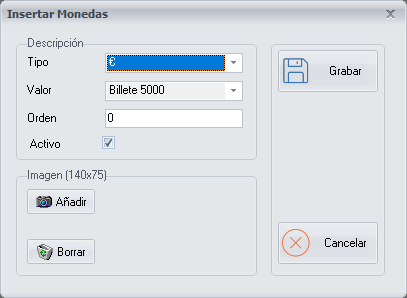
Currency data
- Type: the type of currency. Choose it from the drop-down list.
- Value: the value of the chosen type of currency. Choose it from the drop-down list.
- Order: the order in which you want the currencies to appear on the Break Down Cash Movements screen.
- Active: ticked by default. Untick it when you stop working with a currency.
Image
You can add an image of the currency with the Add button, or remove an existing image with the Delete button.
Buttons
- Save: click it when you have finished setting up the currency.
- Cancel: closes the screen without making any changes.