
Add/Modify Vendors of the Inventory Item
On this screen you set which vendor supplies an inventory item and on what terms: order unit, equivalence, price and discount.
How to get here: Add or Modify button on the Add/Modify Inventory Items screen.
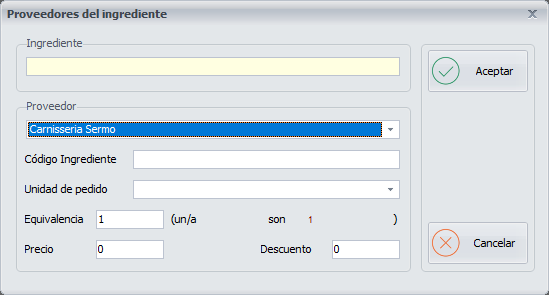
Vendor details
- Vendor: choose it from the drop-down list, which is configured on the Vendors screen.
- Inventory Item Code: it must match the code of the inventory item you entered on the Add/Modify Inventory Items screen.
- Order unit: the unit in which the inventory item is itemised on the vendor's delivery note.
- Equivalence: the equivalence between the stockroom unit and the order unit.
- Price: the price the vendor sets for the order unit.
- Discount: the discount percentage the vendor gives you, if any.
Buttons
- Ok: saves the vendor once you have finished configuring it.
- Cancel: closes the screen without saving the changes.