
Change Sales Item Code
From this screen you change the code of a sales item. It also lets you replace the item or duplicate it.
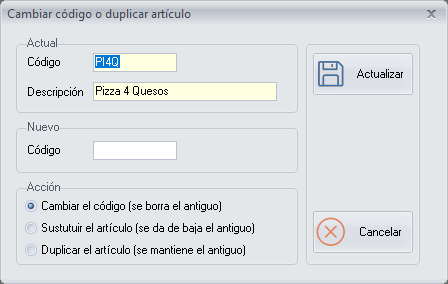
Options
Current
- Code: the current code of the item.
- Description: the description of the item.
New
- Code: the new code.
Action
- Change the code (the old one is deleted)
- Replace the item (the old one is deactivated)
- Duplicate the item (the old one is kept)
Buttons
- Update: applies the chosen action.
- Cancel: closes the screen without making any changes.