
Add/Modify Inventory Items in a Recipe
In this window you set how an ingredient goes into the recipe of an item: whether the customer can remove it, in which orders it is used and in what quantity.
How to get here: Add or Modify button on the Recipe of Sale Items screen.
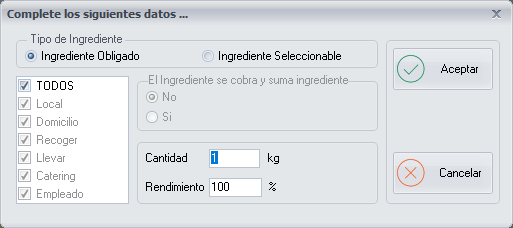
Ingredient Type
| Type | What it means | Example |
|---|---|---|
| Selectable Ingredient | The customer can remove it when ordering the item. Its price can be deducted, as set in the inventory items of the family group. | The bacon of a barbecue pizza |
| Mandatory Ingredient | It cannot be changed or removed. | The pizza dough, the box of delivery pizzas |
Validity scope
It sets in which orders the ingredient is used: ALL, or only some of Dine-in, Delivery, Pick-up, Take-away, Catering and Employee.
It can only be chosen for mandatory ingredients; for selectable ones it is not possible to distinguish by order type.
Example. For the pizza box, the scope would be Delivery, Pick-up and Take-away. For the pizza wedges, Dine-in.
Quantity and Yield
- Quantity: the quantity of product used when preparing the item, in units of use.
- Yield: the percentage of the ingredient that is actually used. In the vast majority of cases it is
100.
Yield example. If only 70 % of 1 kg of chicken is used, because 30 % is waste, the yield is 70.
Buttons
- Ok: saves the ingredient in the recipe.
- Cancel: closes the window without making any changes.