
Homes of a Street
On this screen you enter how many homes there are at each street number of the selected street.
How to get here: Homes button on the Streets screen.
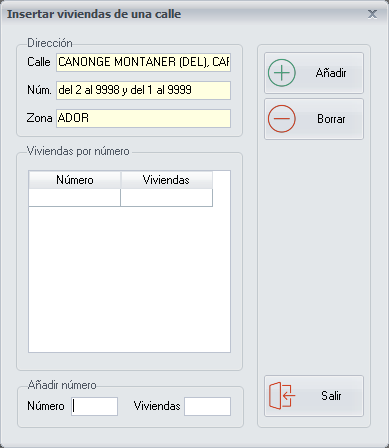
Adding and deleting homes
- To add the homes of a building, type the Street number and the number of Homes, and click Add.
- To remove the homes entered for a building, select the line of the corresponding street number and click Delete.
What these data are for
- When the driver takes an order on the Delivery Orders screen and you have the Days between reminders to flyer building entrances option enabled on the General Options screen, the driver can take the exact number of flyers or leaflets for the homes in the building of the street where the order is going to be delivered, and put them in the mailboxes.
- To do the flyering you need to know how many homes there are at each street number of the street, to deduct the flyers handed out.
Buttons
- Add: adds the street number with its homes.
- Delete: removes the homes of the selected building.