
Frequently Asked Questions (FAQs)
Answers to the most common questions about how the menu is organised in PizzaGest.
How is the restaurant's menu managed?
Major Groups
The Major Groups are in the menu Items → Major Groups.
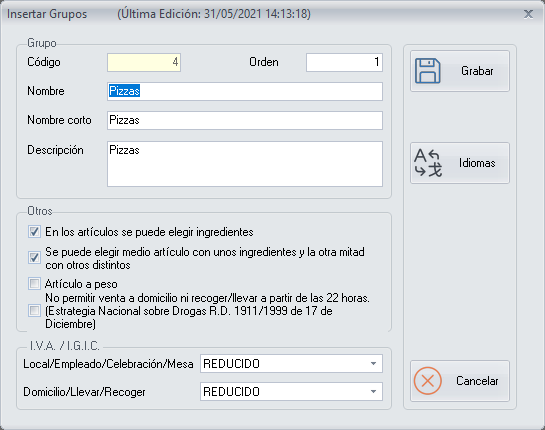
A major group is the highest level of item grouping. With the major groups you create the basic structure of the menu: for example, pizzas, sandwiches, starters, desserts, drinks, etc.
When you Add/Modify Major Groups, choose whether ingredients can be chosen in the products of the major group.
Example. In the pizzas major group, tick that ingredients can be chosen. In the drinks major group, do not activate this option.
Family Groups
The Family Groups are in the menu Items → Family Groups.
For the system, a family group is the grouping of several sales items. Each family group must belong to a major group.
Example. A family group could be the medium pizzas, which belongs to the pizzas major group.
There may be several family groups with the same name as their major group, because there will probably be only one family group within the major group. The starters are an example.
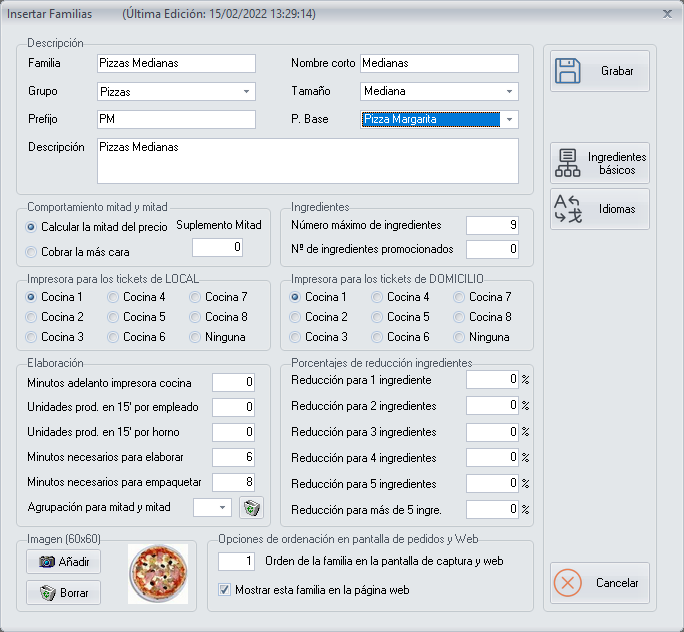
If you activated that ingredients can be chosen when you created the major group of the family group, add to the family group the ingredients that can be included in any sales item of that family group. Do it with the Inventory Items button, which is on the record of each family group, when you Add/Modify Family Groups:
The details of how to include the inventory items of the family group are in the next question.
When you create a family group it is very important to indicate:
- A prefix of two or three letters that identifies the family group. For example,
PMfor the medium pizzas andENfor the starters. - A base product: the most basic or cheapest product. For example, in the pizzas it would be the margherita pizza.
- The size, if within the same major group there are several family groups with the same sales items in different sizes. For example, if you have family-size pizzas and medium pizzas, choose the family size in the family-size pizzas and the medium size in the medium pizzas.
Sales Items
The Sales Items are in the menu Items → Sales Items.
A sales item is any product, prepared or not, that can be sold as a unit. Each sales item must belong to a family group.
Example. A sales item could be the medium barbecue pizza, which belongs to the medium pizzas family group.
If the item belongs to a family group whose major group has ingredient choice activated, when you Add/Modify Sales Items set the ingredients that are part of the item's recipe. Do it with the Recipe button.
When you create a sales item it is very important that its code starts with the prefix of the family group it belongs to.
Example. For a medium barbecue pizza, as the prefix of the medium pizzas is PM, the code could be PMBA.
If you are going to create the same sales items in a different size, use the prefix of the other family group and, after it, put the same as you wrote after the prefix in the first item.
Example. The family-size barbecue pizza takes the prefix of the family-size pizzas family group, PF, followed by the same as the medium barbecue pizza, BA. Its code would be PFBA.
In short
- First create the major group (pizzas), then the family group (medium pizzas) and then the sales item (medium barbecue pizza).
- Within the family group, add the inventory items of the family group, if you ticked in the major group that ingredients can be chosen.
- When you create the sales item, set up the recipe, if you added inventory items to the family group.
How do I add inventory items to a family group?
If the family group belongs to a major group in which you activated that ingredients can be chosen, add to the family group the ingredients that can be included in any sales item of that family group.
Example. The Medium Pizzas family group belongs to the Pizzas major group. In the Medium Pizzas family group, add all the ingredients you want to be available for any medium pizza.
- Open the record of the family group, when you Add/Modify Family Groups, and click the Inventory Items button.
- In Inventory Items of Family Group, add the ingredients you want to be available when any sales item of that family group is selected.
- As you add each inventory item, set its options.
All the options are detailed in Add/Modify Inventory Items in a Family Group. The most important ones are:
- Which Inventory Items Grouping the ingredient belongs to. The groupings are the columns that appear when you Choose Ingredients while placing an order. You can configure them as you wish, but the most common ones come created by default: doughs, sauces, cheeses, meats, fish, vegetables and toppings.
- The price added when the ingredient is added. It is the amount by which the price goes up when you add this ingredient as an extra ingredient, or as a double ingredient if it is already included in the recipe of the sales item.