
Add/Modify Vendors and Creditors Payment Method
On this screen you create a payment method for vendors and creditors or change its details.
How to get here: Add or Modify button on the Vendors and Creditors Payment Method screen.
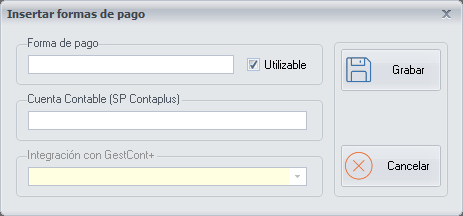
Payment method details
- Payment method: the name of the payment method.
- Available: it comes ticked. Untick it when you stop working with this payment method.
- Accounting Account SP Contaplus: if you use the SP ContaPlus application, the vendor or creditor code this application gives you, to export the payment method from PizzaGest to SP ContaPlus.
- Integration with GestCont+: if you use the GestCont+ application, choose the corresponding vendor or creditor from the drop-down list, to export the payment method from PizzaGest to GestCont+.
Buttons
- Save: click it once you have finished configuring the payment method of the vendor or creditor.
- Cancel: closes the screen without making any changes.