
Add/Modify Expense Categories
On this screen you create an expense category or change its details.
How to get here: Add or Modify button in the Expense Categories window.
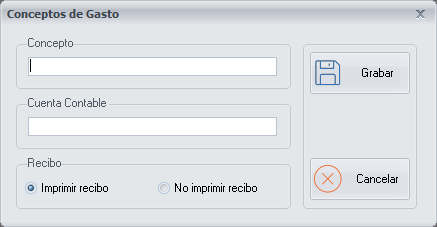
Expense category details
- Concept: the description of the expense category.
- Accounting account: the accounting account, if you want to export the expense category to the GestCont+ application.
Receipt
Choose whether you want a receipt to be printed when you insert an expense operation from the Cashier operations screen.
Buttons
- Save: click it once you have finished configuring the expense category.
- Cancel: closes the screen without making any changes.