
Add/Modify Preparation Comments
On this screen you create a preparation comment or change its data. Preparation comments are printed on the kitchen chit.
How to get here: Add or Modify button on the Preparation Comments screen.
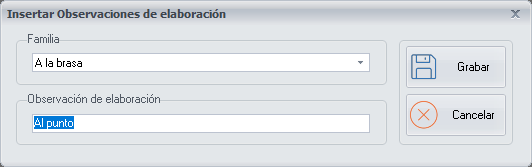
Comment data
- Family Group: choose the corresponding family group from the drop-down list. The comments are classified by family group, and you can add as many preparation comments as you want to each family group.
- Preparation comment: the name of the preparation comment. As it is printed on the kitchen chit, it must be clear, to make the kitchen staff's work easier.
Examples. Medium for meat or Instant for coffee.
Buttons
- Save: saves the preparation comment when you have finished configuring it.
- Cancel: closes the screen without saving the changes.